Attribute Filter Configuration
Overview
Attribute filtering is the core feature for precisely controlling query results. By setting attribute conditions, you can filter CI instances that meet specific business requirements, making query results more precise and valuable.
What this feature can do for you:
- Precisely filter CI instances meeting specific conditions
- Combine multiple conditions to implement complex query logic
- Support rich operators for multiple data types
Main Features
- Visual Filter Condition Builder: No code writing needed
- Rich Operators: Supports specialized operators for different data types
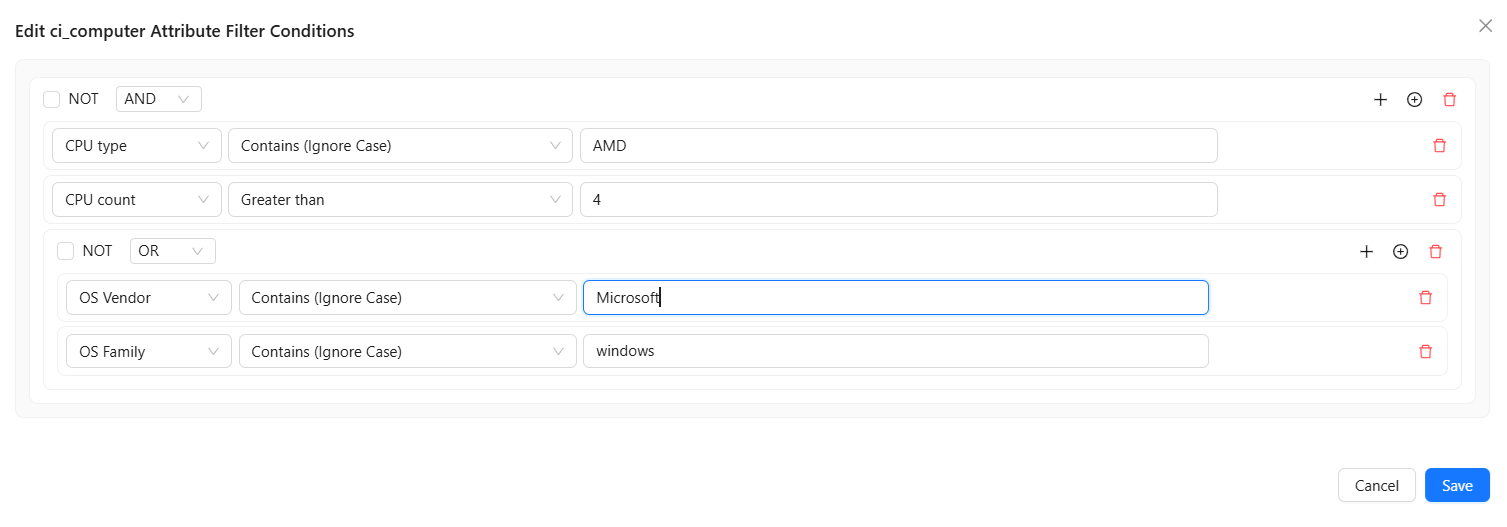
- Logical Combinations: Supports AND/OR/NOT logical combination conditions
- Condition Groups: Supports multi-level condition nesting
Attribute Filter Interface
Below is the editing interface for CI attribute filter conditions:
Operator Reference
Different data types support different operators. Below is the complete operator list categorized by data type:
Text Type Operators
String
| Available Operators | Description | Use Case |
|---|---|---|
| Equals | Exact string match | Find records where attribute value equals a specific string |
| Not Equals | Exclude a specific string value | Exclude records where attribute value equals a specific string |
| Starts With | String starts with specified content | Find records where attribute value starts with a specified prefix |
| Ends With | String ends with specified content | Find records where attribute value ends with a specified suffix |
| Is Empty | Field value is empty or doesn't exist | Find records where attribute is empty |
| Contains (Ignore Case) | Contains, ignoring case | Find records where attribute value contains a specified string (case insensitive) |
| In | String value is in the specified list (comma separated) | Find records where attribute value matches one or more specified strings |
| Not In | String value is not in the specified list (comma separated) | Exclude records where attribute value matches all specified strings |
Email
Same as String type
URL
Same as String type
IP Address
Same as String type
Key-Value List
Key-value list types require selecting a key first, then filtering based on the value for that key. Operators check whether any key-value pair in the list meets the condition.
| Available Operators | Description | Use Case |
|---|---|---|
| Equals | Key exists in list and value exactly matches | Find records where the "Environment" key in tags attribute equals "Production" |
| Not Equals | Key exists in list and value does not equal | Find CIs where the "Environment" key in tags attribute does not equal "Testing" |
| Starts With | Key exists in list and value starts with specified content | Find records where the "Environment" key in tags starts with prefix "Development" |
| Ends With | Key exists in list and value ends with specified content | Find records where the "Environment" key in tags ends with suffix "Testing" |
| Is Empty | Key exists in list and value is empty or doesn't exist | Find records where the value is empty |
| Contains (Ignore Case) | Key exists in list and value contains, ignoring case | Find records where the "Environment" key value contains "Testing" |
| In | Key exists in list and value is in the specified list (comma separated) | Find records where the "Environment" key value matches "Production", "Development", or "Testing" |
| Not In | Key exists in list and value is not in the specified list (comma separated) | Exclude records where the "Environment" key value matches "Production", "Development", or "Testing" |
Usage Example:
- Select a key-value list type attribute like tags, enter key:
Environment→ Operator:Equals→ Value:Production - Meaning: Find CIs where the environment tag is "Production"
Numeric Type Operators
Integer
| Available Operators | Description | Use Case |
|---|---|---|
| Equals | Exact numeric match | Find records where attribute value equals a specific number |
| Not Equals | Exclude a specific number | Exclude records where attribute value equals a specific number |
| Greater Than | Value is greater than specified | Find records where attribute value exceeds a threshold |
| Greater Than or Equal | Value is greater than or equal to specified | Find records where attribute value meets or exceeds a threshold |
| Less Than | Value is less than specified | Find records where attribute value is below a threshold |
| Less Than or Equal | Value is less than or equal to specified | Find records where attribute value does not exceed a threshold |
| Is Empty | Field value is empty or doesn't exist | Find records where attribute is empty |
| In | Value is in the specified list (comma separated) | Find records where attribute value matches one of multiple numbers |
| Not In | Value is not in the specified list (comma separated) | Exclude records where attribute value matches one of multiple numbers |
Long Integer
Same as Integer
Float
Same as Integer
Double
Same as Integer
Datetime Type Operators
Datetime
| Available Operators | Description | Use Case |
|---|---|---|
| Equals | Exact date match | Find records for a specific date |
| Not Equals | Exclude a specific date | Exclude records for a specific date |
| Greater Than | Date is after specified date | Find records after a specified date |
| Greater Than or Equal | Date is on or after specified date | Find records on or after a specified date |
| Less Than | Date is before specified date | Find records before a specified date |
| Less Than or Equal | Date is on or before specified date | Find records on or before a specified date |
| Between | Date is between two dates | Find records within a date range |
| Is Empty | Date field is empty | Find records with no date filled |
Boolean and Option Type Operators
Boolean
| Available Operators | Description | Use Case |
|---|---|---|
| Is True | Boolean value is true | Find records where attribute value is true |
| Is False | Boolean value is false | Find records where attribute value is false |
| Is Empty | Boolean field is empty | Find records where attribute is empty |
Option (Enum)
| Available Operators | Description | Use Case |
|---|---|---|
| Equals | Option value exact match | Find records where attribute is a specific option value |
| Not Equals | Exclude a specific option value | Exclude records where attribute is a specific option value |
| In | Value is in the specified list (comma separated) | Find records where attribute value is one of multiple option values |
| Not In | Value is not in the specified list (comma separated) | Exclude records where attribute value is one of multiple option values |
| Is Empty | Option field is empty | Find records with no option selected |
CI ID Type Operators
CI ID
CI ID types are used to reference other CIs, establishing associations between CIs.
| Available Operators | Description | Use Case |
|---|---|---|
| Equals | Referenced CI ID exact match | Find records matching a specific CI ID |
| Not Equals | Referenced CI ID does not equal | Exclude records matching a specific CI ID |
| In | Referenced CI ID is in the specified list (comma separated) | Find records matching multiple specified CI IDs |
| Not In | Referenced CI ID is not in the specified list (comma separated) | Exclude records matching specified CI IDs |
How to Use
Adding a Single Condition
- Click the + icon button to Add new filter condition
- Select the attribute field to filter
- Select an operator
- Enter or select a comparison value
- The condition is automatically added to the condition list
Combining Multiple Conditions
You can combine multiple conditions using logical operators:
| Logical Operator | Description | Use Case |
|---|---|---|
| AND | All conditions must be satisfied | Need to satisfy multiple filter conditions simultaneously |
| OR | At least one condition must be satisfied | Need to satisfy any one filter condition |
| NOT | Negate the condition | Exclude records meeting specific conditions |
Condition Groups
For complex queries, you can create condition groups:
- Select multiple conditions
- Click the ⊕ icon button to Add new subgroup
- Select the group's logical operator (AND/OR)
- You can nest more groups within a group
Example: Find CIs where "(status is running AND region is East) OR (status is pending maintenance AND priority is high)"
Data Type Summary
The above operator descriptions cover all data types supported in CMDB. For the complete data type list, see: Attribute Types