CI List
Overview
CI List is a core module for viewing and managing configuration items in the CMDB. By creating different list views, you can flexibly organize and display CI data to meet various business needs.
What this module can do for you:
- Create custom CI list views (e.g., "All Servers", "Production Applications", etc.)
- Filter CI data through queries
- Dynamically configure table columns to select attributes to display
- Support batch operations and export functionality
- Create and associate CIs (including multi-step creation with strong dependencies)
Main Features
- Lists: Left panel displays categorized system and custom lists
- Lists Management: Create, edit, clone, and delete custom lists
- Dynamic CI Attribute Display: Automatically select attributes to display based on the selected CI type
- Multi-Tab Detail Page: View CIs across four dimensions: Details, Dependencies, Components, History
- Advanced Filtering: Support for complex filter conditions and query configurations
- CI Operations: Support batch delete, export current list, create CI, create associated CI
- Persistent Settings: Table column settings, density, page size automatically saved to local storage
Interface Layout
The CI List page uses a left-right split layout:
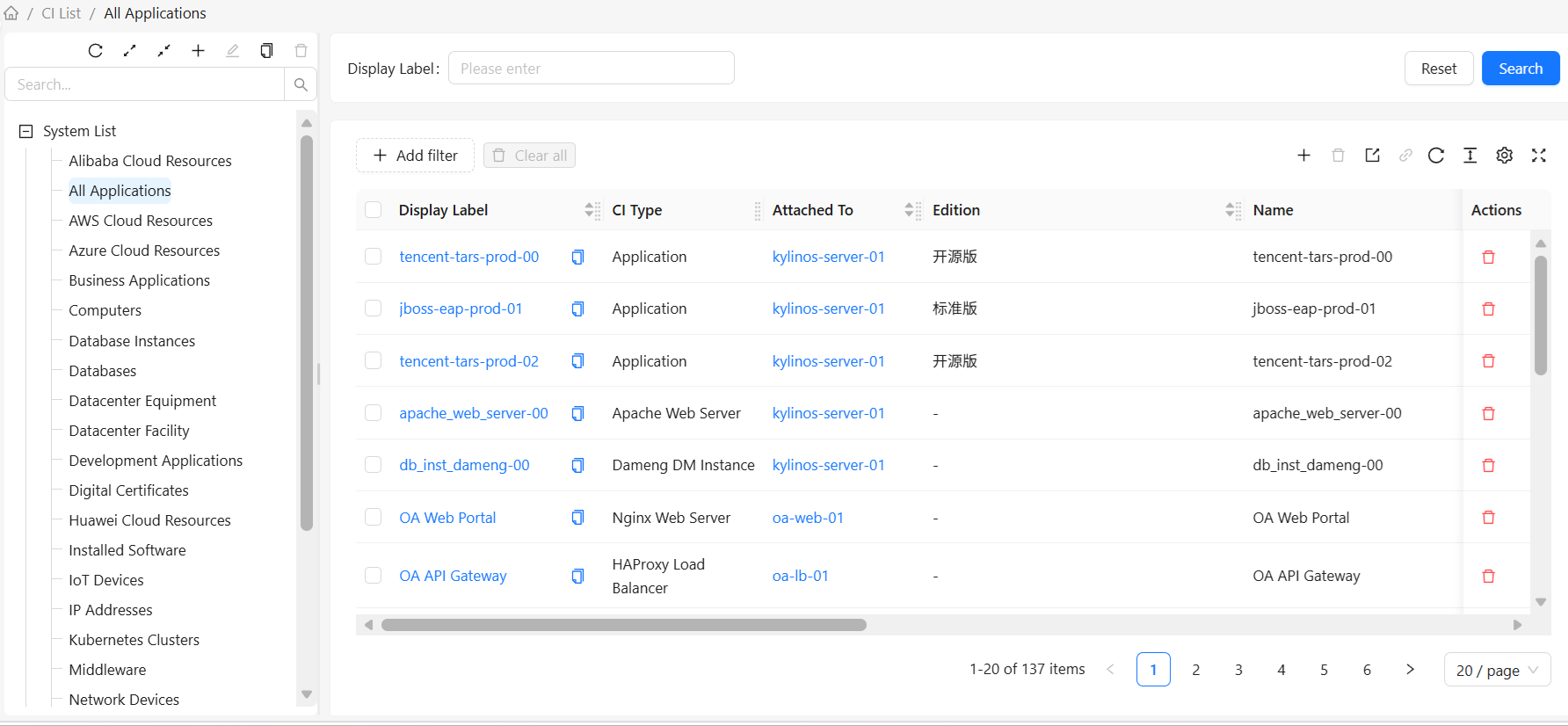
Left: CI Lists
The left side displays all CI list views, grouped by type:
- System Lists: System predefined list views
- Custom Lists: User-created custom list views
List Operations:
- Add List: Click the "Add" button at the top to create a new list
- Edit List: Select a list, click the "Edit" button at the top to edit the selected list
- Clone List: Select a list, click the "Clone" button at the top to clone the selected list
- Delete List: Select a list, click the "Delete" button at the top to delete the selected list (system lists cannot be deleted)
Right: CI Instance List
The right side displays CI data for the selected list view:
- Configuration Items: Display corresponding CI attributes based on the selected CI type
- Advanced Filtering: Configure filter conditions to filter data
- CI Data Operations: Operations available for CIs listed in the view: create/edit individual CIs, batch delete CIs, batch export CIs, create associated CIs, etc.
- Pagination: Support paginated browsing of large datasets
How to Use
View Configuration Items
- Select a list view in the left panel
- The right side automatically displays CI data for that view
- Click a CI row to view details
Search Configuration Items
Use the quick search box above the right list:
- Enter the CI display name in the quick search box, then click the "Search" button
- The list automatically filters to show only matching CIs
- Click the "Reset" button to restore all CIs
Create a Custom List
- Click the "Add" button above the left list
- Fill in the list view information in the popup dialog:
- Name: Unique identifier for the list view
- Display Name: Display name for the list view
- Root CI Type: Select the CI type to query
- Type Filter: Set options such as including subtypes
- Attribute Conditions: Add filter conditions (optional)
- Click "OK" to save
Edit a List
Note: Only custom list views can be edited. System lists cannot be edited.
- Select the list view you want to edit in the user list
- Click the "Edit" button at the top
- Modify the list view configuration
- Click "OK" to save
Clone a List
- Select the list view you want to clone
- Click the "Clone" button at the top
- Modify the cloned list name (the name must be unique)
- Click "OK" to save
Delete a List
Note: Only custom list views can be deleted. System lists cannot be deleted.
- Select the list view you want to delete in the CI list
- Click the "OK" button in the popup menu
- Confirm the deletion
CI List Configuration
The CI List configuration page is used to create and edit list views. For detailed steps, see CI List Configuration
CI Instance List
CI instance operations such as create, read, update, delete, and export can be performed on the CI instance list. For detailed steps, see CI Directory
System Lists vs. Custom Lists
| Feature | System Lists | Custom Lists |
|---|---|---|
| Source | System predefined | User created |
| Modification | Cannot be edited or deleted | Can be edited and deleted |
| Purpose | Provide common views | Meet specific needs |