Identification Rules
Overview
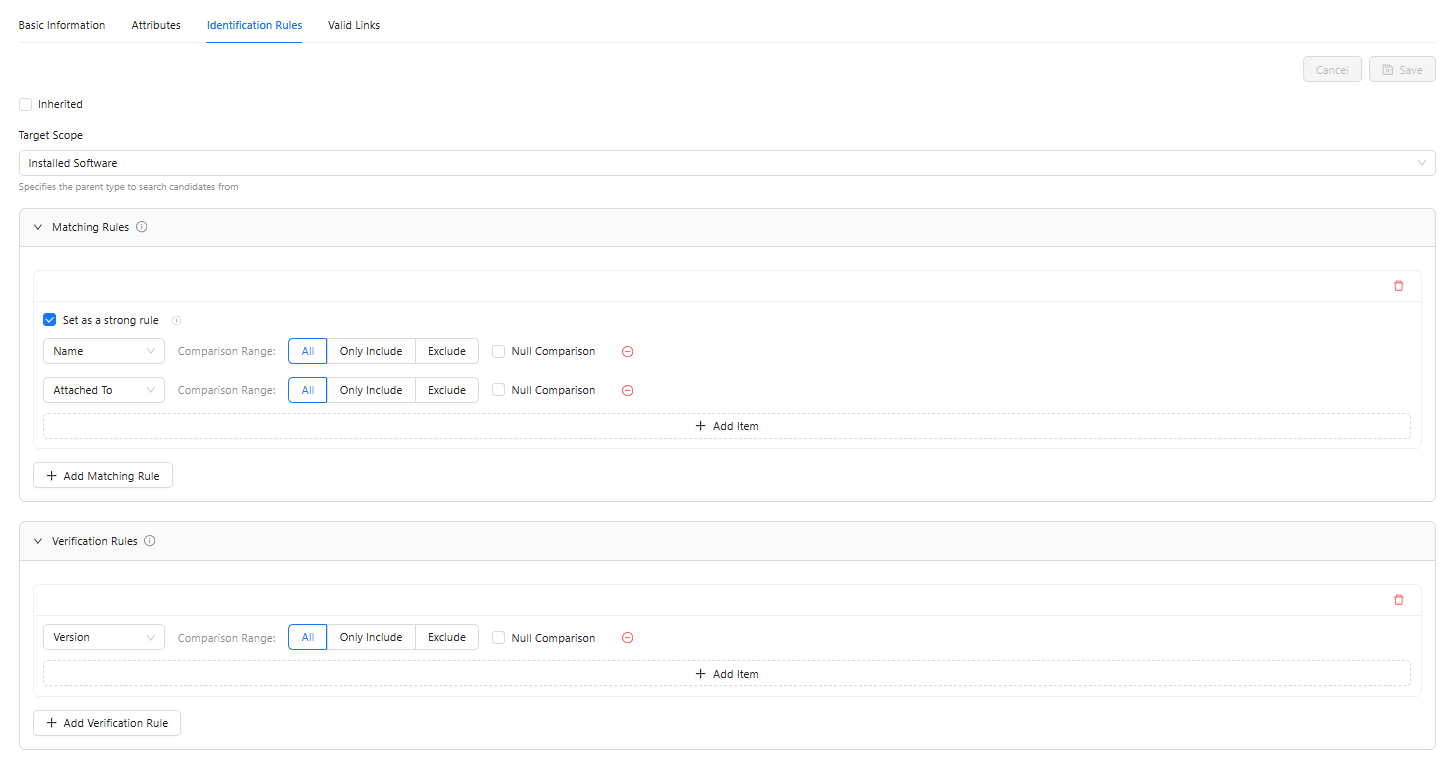
Identification rules are used to automatically identify and merge duplicate CIs. When the system collects CI information from different data sources, identification rules can determine whether the information represents the same CI, thus avoiding duplicate data.
Business Value:
- Automatically discover and merge duplicate CIs
- Maintain uniqueness of CI data
- Improve data quality, reducing manual cleaning and maintenance costs
How It Works
Identification rules consist of two parts:
1. Matching Rules
Purpose: Determine whether two CIs might be the same CI.
Logic: If any single matching rule is satisfied, the two CIs are considered "possibly the same."
Example:
- Rule 1: Same IP address → might be the same server
- Rule 2: Same hostname → might be the same server
If the IP address is the same OR the hostname is the same, they are considered possibly the same server.
2. Validation Rules
Purpose: Further verify whether two "possibly the same" CIs are actually the same.
Logic: If any single validation rule is not satisfied, even if the matching rules are met, the two CIs are considered "not the same."
Example:
- Rule 1: Same serial number → check next validation rule
- Rule 2: Same asset tag → confirmed as the same server
Even if the IP address is the same, if the serial number is different or the asset tag is different, they are considered different servers.
Combined Judgment Flow
1. Check matching rules
   ├─ No matching rules satisfied → Not the same CI (don't merge)
   └─ At least one matching rule satisfied → Enter validation (might be the same CI)

2. Check validation rules
   └─ Any validation rule not satisfied → Not the same CI (don't merge)
Interface Layout
The Identification Rules tab contains the following areas:
| Area | Description |
|---|---|
| Inheritance Setting | Whether to inherit identification rules from the parent type |
| Target Scope | Specify from which parent type to start searching for candidates |
| Matching Rules | Configure rule list for initial judgment |
| Validation Rules | Configure rule list for final confirmation |
Inheriting Parent Type Rules
If the "Inherit" option is checked, the current type will use the identification rules defined by its parent type.
Note:
- When inheriting, rules are read-only and cannot be modified
- After unchecking, the system copies the parent type's rules to the current type by default. Users can then edit based on these rules
Target Scope
Target scope specifies from which parent type the system starts searching when looking for matching CIs.
Option Description:
| Option | Description |
|---|---|
| Not Set | Search within the current type and all its subtypes |
| Specify Parent Type | Start from the specified parent type, including that type and its subtypes |
Use Cases:
- Not Set: Use for most cases; only find duplicates within the current type's instances
- Specify Parent Type: Use when cross-type duplicate detection is needed, e.g., finding duplicates between "Windows" and "Linux" (both have "Computer" as parent type)
Adding Matching Rules
Steps
- Click the "Add Matching Rule" button
- Select a comparison attribute (e.g., Primary IP Address)
- Set comparison value range
- To add more attributes to this matching rule, click the "Add Match Item" button
- Click "Save"
Comparison Value Range
Comparison value range limits which CIs participate in comparison:
| Option | Description |
|---|---|
| All Values | All CIs participate in comparison |
| Only Include | Only compare CIs with specified values |
| Exclude | Don't compare CIs with specified values |
Use Cases:
- All Values: Use for most cases
- Only Include: Only compare CIs with specific attribute values, suitable for using different matching rules for different subsets of the same CI type (see Scenario 3)
- Exclude: Exclude certain special CIs, e.g., excluding test environment servers; the reverse of "Only Include"
Strong Rule Setting
Checking "Set as Strong Rule" for a matching rule means that rule can be used to create CIs.
Description:
- Strong rules improve matching accuracy, avoiding creating potentially duplicate CIs when information is insufficient
- If a matching rule is not set as a strong rule, it can only be used to update CIs, not to create them. Therefore, a CI type must have at least one strong matching rule
Adding Validation Rules
Validation rules are configured the same way as matching rules, but their purpose is to finally confirm whether two CIs are the same.
Steps
- Click the "Add Validation Rule" button
- Select a comparison attribute (e.g.,
Serial Number) - Set comparison value range
- To add more attributes to this validation rule, click the "Add Match Item" button
- Click "Save"
Comparison Value Range
Same options as matching rules:
| Option | Description |
|---|---|
| All Values | All CIs participate in comparison |
| Only Include | Only compare CIs with specified values |
| Exclude | Don't compare CIs with specified values |
Use Cases: Same as matching rules.
Null Value Comparison
In matching rules or validation rules, checking "Null Value Comparison" includes null values in comparison.
Description:
- Enabled:
null == nullreturns true; two null values are treated as equal - Disabled: Null values are skipped and don't participate in comparison
Use Cases:
- Usually disabled, as null values may mean "not filled in" rather than truly equal
- Some special cases may need enabling, e.g., "uncategorized" CIs
Best Practices
Choosing Reliable Matching Attributes
The effectiveness of identification rules depends on the quality of selected attributes. Refer to these principles:
| Attribute Characteristic | Description | Examples |
|---|---|---|
| Unique and stable | Suitable as matching basis | Serial Number, Asset Tag, MAC Address |
| Unique but unstable | Can be used for matching but needs validation rules | Primary IP Address (may be reassigned), Hostname (may be renamed) |
| Not unique | Not suitable for standalone use; combine with other attributes | OS Family, Name |
Combining Strong and Weak Rules
| Recommendation | Reason |
|---|---|
| Set at least one strong matching rule | Ensures the system has enough identification information to create CIs |
| Multiple strong rules should share at least one common attribute | Avoids creating duplicates when different information sources match different strong rules; if subsequent uploads match multiple strong rules with no common attributes, it will fail |
| Weak rule attributes should exist in at least one strong rule | Otherwise weak rules can't match CIs created by strong rules and won't be able to update them |
| Avoid enabling null value comparison | Null values usually mean "data not yet collected"; enabling may cause incorrect merging of incomplete CIs |
| Use comparison value range to limit rule scope | When different matching logic is needed for different subsets of the same CI type, add distinguishing attributes to the rule and use comparison value range (include/exclude) to limit scope |
Combining Matching and Validation Rules
| Recommended? | Practice | Reason |
|---|---|---|
| Yes | Use broad attributes for matching, precise attributes for validation | Broad then strict — can find candidates and avoid incorrect merging |
| Yes | Set matching rules as strong rules whenever possible | Ensures sufficient information before creating CIs, avoiding duplicates |
| No | Only configure matching rules without validation rules | Missing final confirmation step may cause incorrect merging of different CIs |
Using Inheritance Appropriately
| Scenario | Recommended Approach |
|---|---|
| Subtype identification logic same as parent | Inherit parent rules to reduce duplicate configuration |
| Subtype needs completely different identification logic | Disable inheritance and customize rules |
| Subtype needs minor adjustments on parent basis | Disable inheritance and modify the copied rules |
Configuration Examples
Scenario 1: Identify Computers by Primary IP and Hostname
Business Need: Identify servers by primary IP address and hostname, with serial number for further confirmation.
Configuration:
Matching Rules:
- Comparison attribute:
Primary IP Address, operator:equals, range:All Values - Comparison attribute:
Name, operator:equals, range:All Values
Validation Rules:
- Comparison attribute:
Serial Number, operator:equals, range:All Values
Workflow:
- If two CIs have the same primary IP address AND hostname → might be the same
- If serial number is also the same → confirmed as the same, merge data
- If serial number is different → not the same, don't merge
Scenario 2: Identify Network Devices by Asset Tag
Business Need: Use asset tags as the primary identification basis to ensure uniqueness.
Configuration:
Matching Rules:
- Comparison attribute:
Asset Tag, operator:equals, range:All Values
Validation Rules: (Not configured; matching rule alone meets the need)
Workflow:
- Same asset tag → same device
- Different asset tag → different device
Scenario 3: Different Matching Logic by Attribute Value
Business Need:
The same type includes both virtual and physical machines with different matching criteria: VMs are identified by External Object ID (e.g., AWS Instance ID, VMware MOB ID), while physical machines are identified by name and serial number.
Prerequisites:
- Type includes an
Is Virtualboolean attribute for distinguishing VMs from physical machines
Configuration:
Matching Rule 1 (for VMs):
| Setting | Value |
|---|---|
| Comparison attribute | Is Virtual |
| Comparison value range | Only Include: true |
| Setting | Value |
|---|---|
| Comparison attribute | External Object ID |
| Comparison value range | All Values |
Matching Rule 2 (for Physical Machines):
| Setting | Value |
|---|---|
| Comparison attribute | Is Virtual |
| Comparison value range | Only Include: false |
| Setting | Value |
|---|---|
| Comparison attribute | Name |
| Comparison value range | All Values |
| Setting | Value |
|---|---|
| Comparison attribute | Serial Number |
| Comparison value range | All Values |
Workflow:
- VMs: CIs where
Is Virtualistrueare matched viaExternal Object ID - Physical machines: CIs where
Is Virtualisfalseare matched viaNameandSerial Number - Both rules don't interfere with each other; each only applies to CIs meeting its conditions
Frequently Asked Questions
Q: What's the difference between matching rules and validation rules?
A:
- Matching Rules: Initial judgment, uses "OR" logic (satisfying any one is enough)
- Validation Rules: Final confirmation, uses "AND" logic (failing any one means not the same)
Q: Must both matching and validation rules be configured?
A: No. You can configure only matching rules, in which case the system only performs initial judgment. However, it's recommended to configure validation rules as well for improved accuracy.
Q: How should target scope be set?
A: In most cases, no setting is needed (default is fine). Only specify a parent type when cross-type duplicate detection is needed.
Q: How to test if identification rules are effective?
A: You can test through these methods:
- Import potentially duplicate CI data from different data sources
- Observe whether the system correctly identifies and merges duplicate data
- Check whether merged CIs contain information from all sources